
Web2Print Portals for Multi-team Organisations
Give marketing, HR, sales and operations one place to order their branded materials. Each team gets the right products, with clear ownership of artwork, budgets and approvals.
Different teams. One simpler way to order.
Bring departmental print, workwear and merchandise into a shared portal. Teams order within their permissions, marketing controls the brand and the right managers review requests. We handle production and fulfilment.
Relevant ranges.
HR sees staff materials. Marketing sees campaigns. Each team finds what it needs.
Clear ownership.
The right people manage artwork, spending decisions and order approvals.
Less chasing.
Keep product selection, proofs and ordering together instead of in separate email chains.
Give each department the right catalogue.
Your HR team needs staff clothing and welcome materials. Sales needs business cards and collateral. Marketing needs campaign print and event displays.
Show each team the products and categories relevant to its work, with shared essentials available to the people who need them.
Keep marketing in control of the brand, not every small edit.
Let users personalise permitted names, job titles and contact details in approved templates. They check a proof and order, while your design rules stay in place.
Authorised Artwork Managers keep catalogue designs current, so marketing can maintain the range without handling every repeat artwork request.
Keep purchases connected to teams and budgets.
Configure how materials are purchased and allocated across your departments. Teams can call off prepaid stock or order priced products under your agreed account and budget arrangements.
Reporting helps identify who is ordering and where materials are going, giving managers a clearer view of shared stock and departmental usage.
Send approvals to the people responsible.
Marketing can review selected branded materials while other managers oversee the orders relevant to their teams. Approval permissions can combine user groups and product categories.
Require sign-off for selected users, order values or artwork customisations. Allow suitable routine purchases to proceed automatically, without chasing approval for everything.
Give each team the tools it needs.
A shared portal, with access built around individual responsibilities.
Product Visibility
Show departments and individual users the products relevant to their responsibilities.
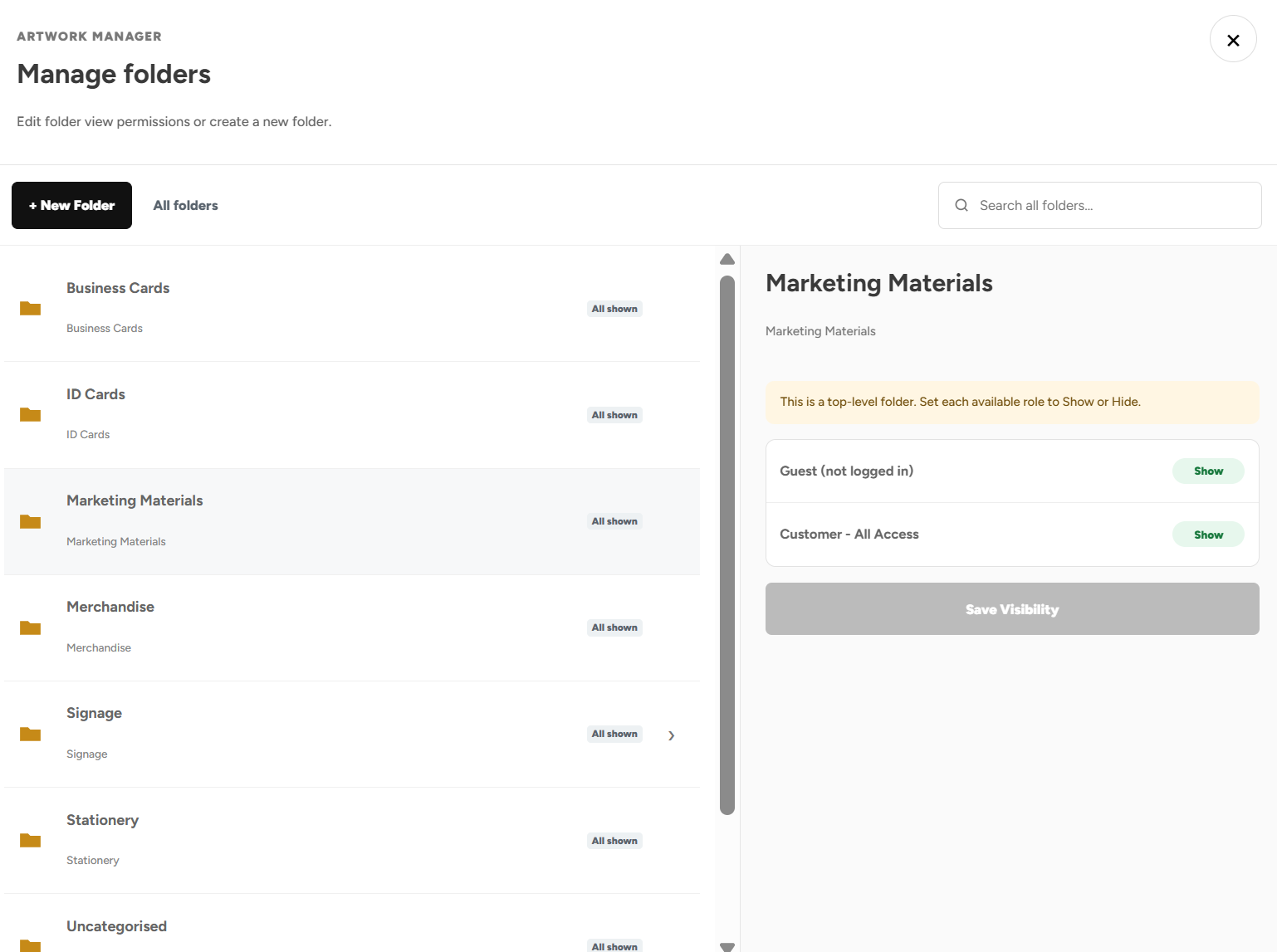
Artwork Builder
Let teams personalise permitted details within approved branded templates.
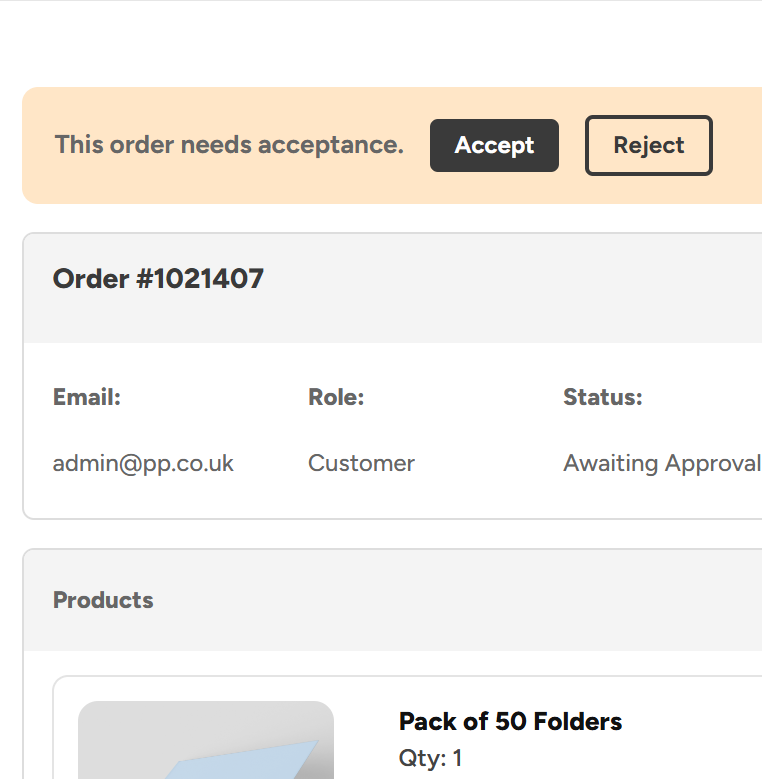
Admin Order Approvals
Give the right managers oversight of artwork and departmental orders.
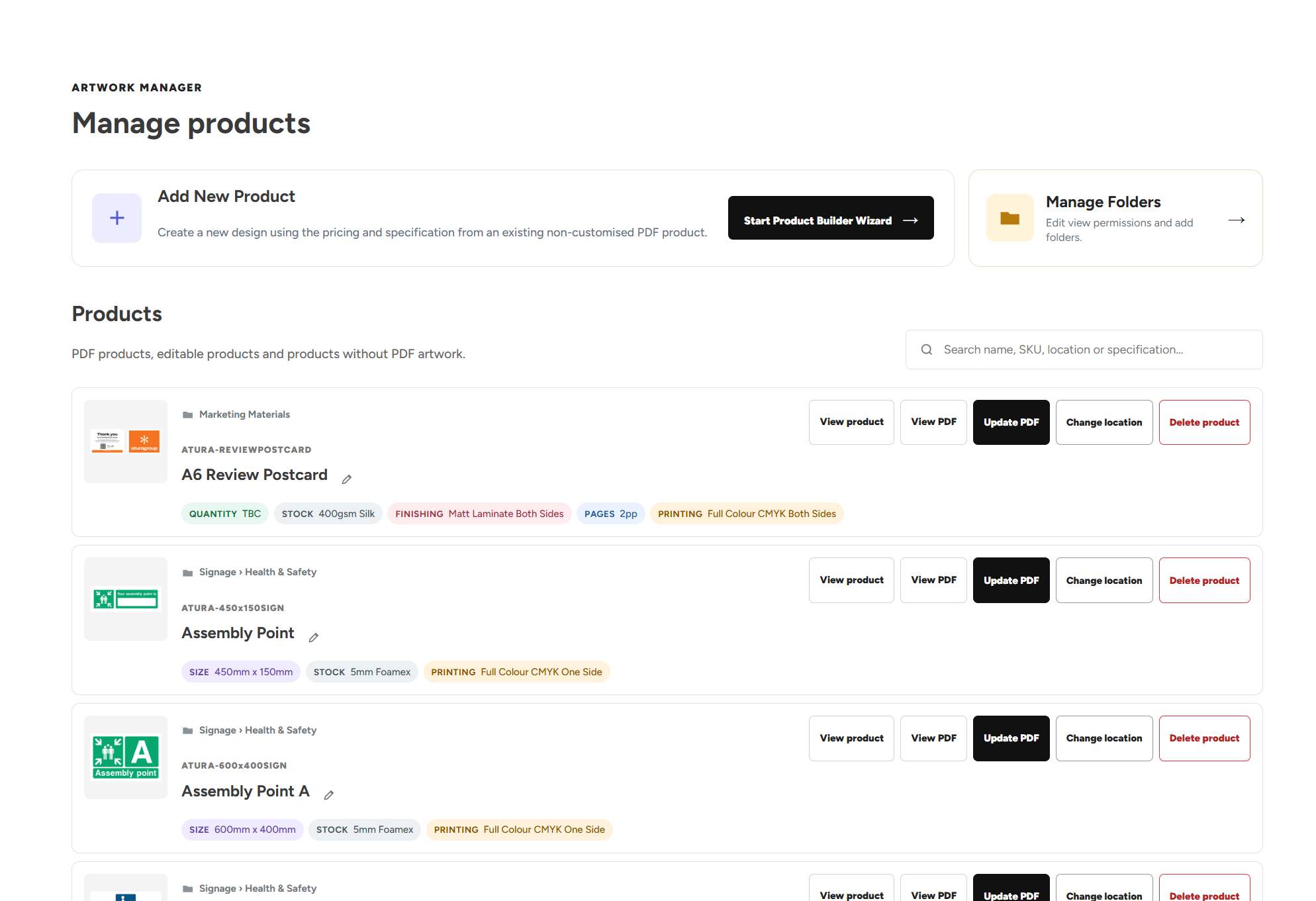
Artwork Manager
Let authorised users maintain catalogue designs, folders and product visibility.
Upload Your Own Artwork
Upload a finished PDF to a preset product and review it before ordering.
Account Access
Manage accounts and permissions as people join, change roles or leave.
A company event, without scattered requests.
An example of different teams preparing for the same event through one portal.
Prepare the approved range.
Marketing adds the event artwork and makes the relevant materials available to participating teams. Templates allow permitted personalisation where needed.
Let each team order.
HR selects clothing, sales orders collateral and the events team chooses its displays. Each request follows the permissions and approval rules configured for those users.
Review and fulfil.
Approvers check the requests that need sign-off. We produce or dispatch the ordered materials, with artwork and delivery details recorded against each order.
Multi-team Web2Print questions, answered.
How departmental access, artwork, spending and approval responsibilities fit together.
Teams and permissions
What is a Web2Print portal for a multi-team organisation?
A multi-team Web2Print portal is a branded online ordering system shared by departments such as marketing, HR, sales and operations. It brings approved print and branded products into one catalogue, with access and ordering rules configured around different responsibilities. Print Portals supports the production and fulfilment of the materials ordered through that system.
Can HR, marketing, sales and operations use the same print portal?
Yes. Different departments can use one portal while seeing the products relevant to their work. HR might order workwear and staff materials, sales might order business cards and collateral, and marketing might manage campaign print. Shared products can be made available to the relevant groups, with permissions and approvals set around the people using them.
Can we hide products that are irrelevant to a department?
Yes. Product Visibility can show or hide categories and individual products by team, department, user group, role or named user. You can organise the catalogue so people do not have to search through unrelated ranges. Category restrictions also carry through to the subcategories and products inside them.
Can some products be shared across teams while others stay restricted?
Yes. Your catalogue can include shared essentials alongside more restricted departmental products. For example, several teams could order branded stationery while selected users have access to specialist event materials. We configure the visibility rules around your requirements so access reflects what each group needs to order.
Do we need multiple office locations to benefit from a print portal?
No. A portal can support different teams within the same office or organisation. The value comes from giving users a clear catalogue, approved artwork and an agreed ordering process. Departmental permissions and approval responsibilities can be useful even when all of your materials go to the same delivery address.
Can we change access when someone joins, moves department or leaves?
Authorised administrators can manage user accounts and permissions through Account Access, including adding users in bulk and removing access when required. When someone changes responsibilities, their product access and ordering permissions should be reviewed against their new role. Our team can help configure the relevant groups and access arrangements where needed.
Artwork and approvals
Can staff personalise business cards without asking marketing to edit each one?
Yes. An Artwork Builder template can let users enter permitted details such as names, job titles and contact information while keeping the agreed design controlled. They generate and check a proof before ordering. This gives users a direct way to request personalised materials without requiring marketing to make every small change manually.
Can marketing maintain the artwork used by other departments?
Authorised Artwork Managers can replace catalogue PDFs, review artwork checks and approve updated designs. They can also add new designs using preset specifications and pricing, organise folders and choose which user groups can see them. The approved replacement is available for future orders, helping other departments use the current catalogue artwork.
Can our designers upload finished PDFs rather than use editable templates?
Yes. Upload Your Own Artwork lets a user select a preset product, upload a print-ready PDF and review the checks and preview before adding it to the basket. The checks include dimensions, page count, bleed and crop marks. You can provide editable templates for routine personalisation and upload-enabled products for users supplying finished designs.
Can approval responsibilities be split between marketing and department managers?
Yes. Approver permissions can combine user groups and product categories. Marketing could review relevant branded materials while a department manager reviews selected orders from their users. Multiple people can cover the same requests. We work with you to configure the permissions around who should be able to review which orders.
Can routine team orders proceed without approval every time?
Yes. Your setup can allow trusted users or selected product categories to proceed automatically, with approval required where it matters. Other options include spending thresholds and sign-off for orders containing Artwork Builder customisations. Orders that require review remain on hold until accepted, while requests covered by automatic approval can proceed.
Will approvers be notified when a team places an order requiring review?
Relevant approvers receive email notifications for orders they can review, with weekday reminders for outstanding requests. They can check the products, artwork, quantities, pricing and delivery details within the portal before approving or rejecting the order. Customers receive an update when a decision is made.
Budgets and getting started
Can orders be allocated to different teams and budgets?
Your portal can be configured around the way your organisation pays for and allocates purchases, including relevant teams, departments and budgets. Some materials may be funded centrally, while other orders follow the purchasing arrangements agreed for a particular group. We establish the payment, reporting and approval requirements with you during setup.
Can teams call off materials that the business has already paid for?
Yes. Suitable products can be bought in bulk and held in our UK warehouses. Prepaid stock can appear at £0 for authorised users to call off as needed. Live stock levels show what is available, while low-stock notifications help plan replenishment. You can use visibility and approval rules to control access to shared supplies.
Can managers see who is ordering shared stock?
Reporting can show who is ordering stock and where it is going. Where costs are allocated to teams or budgets, the reporting supports that agreed setup. Managers can also review requests under your approval rules and reject excessive or unnecessary orders, helping protect materials bought for shared use.
Can different teams use account purchasing or pay by card?
We can configure purchasing around your organisation’s requirements, including agreed account arrangements and individual card payments. This can support centrally funded materials alongside purchases made by independent users. We confirm how the relevant products should be paid for and allocated, rather than assuming every department uses the same purchasing process.
Is there a portal fee for each department or user?
Print Portals does not charge portal setup fees, an ongoing portal subscription or a per-user platform fee. Your organisation pays for products and any applicable delivery or additional services under the agreed order arrangements. New users and team requirements can be reviewed as the way you use the portal develops.
How do we agree a portal setup when several departments are involved?
Start by identifying what each team orders, which products are shared and who owns the artwork and purchasing decisions. We review your existing materials and specifications, agree the range and pricing, then configure product visibility, templates and approval permissions. We also discuss payment, stockholding and reporting requirements before helping users get familiar with the process.
Let teams get on with their work.
Tell us who orders, what they need and where requests get held up. We’ll build a free portal around the way your teams work.